How I Built My Blog with Hygraph and Astro
I moved my blog to Hygraph and wired it into Astro. Here's the content model, the query layer, and how markdown becomes rendered pages.
Hygraph is a headless CMS built on GraphQL, and it fits Astro well. You pull content at build time, render it to static HTML, and ship a fast site with no server running. I moved my blog over to this setup recently, and the mechanics were simpler than I expected.
I got pulled in through Hygraph’s MCP server, of all things (more on that another time). What started as “let me see what this does” turned into a full migration. Here’s how the pieces fit together.
The content model
You define the schema in Hygraph’s visual editor, then query everything through a single GraphQL endpoint. My blog has three content types:
- BlogPost:
slug,title,description,postDate,body(a markdown field),tags,categories, acoverImageasset, and a relation toAuthor. - Author:
slug,name,bio, and aprofileJSON field for avatar and social links. - SiteSettings: a singleton holding site-wide values like title, description,
href, locale, posts-per-page, navigation, and social links.
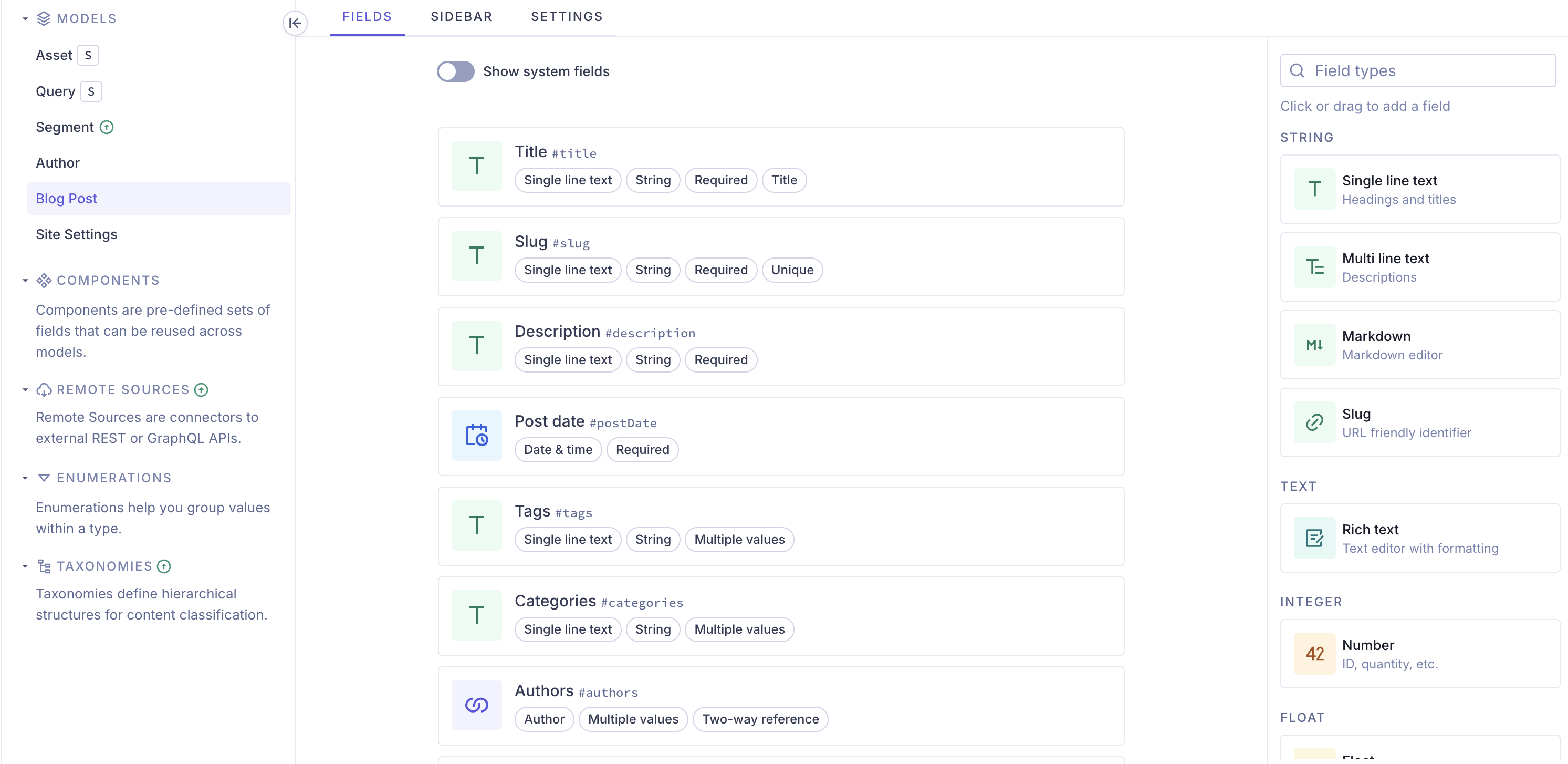
The important call is that body is markdown, not rich text. Writing stays simple, and you get a clean string to render however you want. Hygraph stores it as body.markdown.
Connecting Astro to Hygraph
All the CMS access lives in one module, src/lib/hygraph.ts. It reads the endpoint from an env var and exposes typed query helpers:
const endpoint =
  import.meta.env.HYGRAPH_ENDPOINT ||
  'https://ap-south-1.cdn.hygraph.com/content/<your-project>/master'

async function query<T>(query: string): Promise<T> {
  const response = await fetch(endpoint, {
    method: 'POST',
    headers: {
      'Content-Type': 'application/json',
      ...(import.meta.env.HYGRAPH_TOKEN
        ? { Authorization: `Bearer ${import.meta.env.HYGRAPH_TOKEN}` }
        : {}),
    },
    body: JSON.stringify({ query }),
  })

  const payload = (await response.json()) as {
    data?: T
    errors?: { message: string }[]
  }
  if (!response.ok || payload.errors?.length || !payload.data) {
    throw new Error(
      payload.errors?.map((error) => error.message).join(', ') ||
        'Hygraph request failed',
    )
  }
  return payload.data
}
HYGRAPH_TOKEN is optional. You only need it if your content isn’t public.
A query helper for posts looks like this:
export async function getHygraphPosts(): Promise<BlogPost[]> {
  const { blogPosts } = await query<{ blogPosts: HygraphPost[] }>(`
    query BlogPosts {
      blogPosts(orderBy: postDate_DESC) {
        slug title description postDate tags categories
        body { markdown }
        coverImage { url width height fileName }
        authors { slug name }
      }
    }
  `)
  return Promise.all(blogPosts.map(toBlogPost))
}
Rendering markdown
Hygraph hands back body.markdown as a plain string. To turn it into HTML at build time, use Astro’s markdown processor:
import { createMarkdownProcessor } from '@astrojs/markdown-remark'

async function toBlogPost(post: HygraphPost): Promise<BlogPost> {
  const renderer = await createMarkdownProcessor()
  const rendered = await renderer.render(post.body.markdown)
  return {
    id: post.slug,
    body: rendered.code,
    headings: rendered.metadata.headings ?? [],
    data: {
      title: post.title,
      description: post.description,
      date: new Date(post.postDate),
      tags: post.tags ?? [],
      // ...
    },
  }
}
Then inject the rendered HTML in a page:
<article class="prose">
  <Fragment set:html={post.body} />
</article>
Because this runs inside getStaticPaths(), it still happens at build time. You get static output, just sourced from the CMS instead of local files.
Swapping out content collections
If you’re migrating from Astro content collections, the change is mostly mechanical. Swap CollectionEntry<'blog'> for a BlogPost type from hygraph.ts, and getCollection('blog') for getHygraphPosts().
Images change too. Astro’s <Image /> component does support remote images once you allow the domain via image.domains or image.remotePatterns. I chose a plain <img> instead, because Hygraph already returns the CDN URL and the asset’s dimensions, and its CDN serves transformed assets itself. There’s nothing left for Astro to optimize, so a plain <img> keeps it simple:
<img
  src={post.data.image.src}
  alt={post.data.image.alt || post.data.title}
  width={post.data.image.width || 1200}
  height={post.data.image.height || 630}
/>
Static generation
Generate routes from the CMS at build time:
export async function getStaticPaths() {
  const posts = await getHygraphPosts()
  return posts.map((post) => ({ params: { id: post.id }, props: post }))
}
That’s the whole loop. Define the schema in Hygraph, query it with a typed helper, render markdown at build time, and generate static pages.
What’s next
The content side is the easy part. The hard part is triggering a build every time you publish, because pointing Hygraph’s webhook straight at GitHub doesn’t work. That gets its own post: Why the Hygraph Webhook Wouldn’t Trigger My GitHub Build.